

Published on May 01, 2025 | 4 min

In a glass-walled boardroom, a CISO is confidently unveiling the company’s next-gen cybersecurity stack.

There’s AI-powered threat detection, real-time risk scoring, and a Zero Trust framework that costs more than a luxury car. Heads nod around the table. Everything looks secure, on paper.

Meanwhile, somewhere across the organization, an employee logs into a critical internal app using “Welcome@123.”

It checks all the boxes—a capital, a symbol, numerical, and just enough complexity to feel safe. But it’s not.

Here’s the truth: with all the encryption, endpoint hardening, and biometric buzzwords floating around, it still takes just one weak password to bring everything crashing down.

We love to talk about tech. But most breaches don’t come from sophisticated hacks; they happen because people are tired, distracted, and just trying to get through the day.

And in that moment, convenience wins.

Passwords are personal, and that’s a problem

Think about the last time someone asked you to create a password. Chances are, your brain didn’t leap to “secure.” It went straight to “memorable.”

A pet’s name, a favorite band, the street you grew up on, maybe with a number slapped on the end.

Here’s the tricky part: most people think their password is clever enough.

“Sure, it’s my dog’s name… but it’s spelled backwards… with a 3 instead of an E. That’s good, right?”

Well, it’s not.
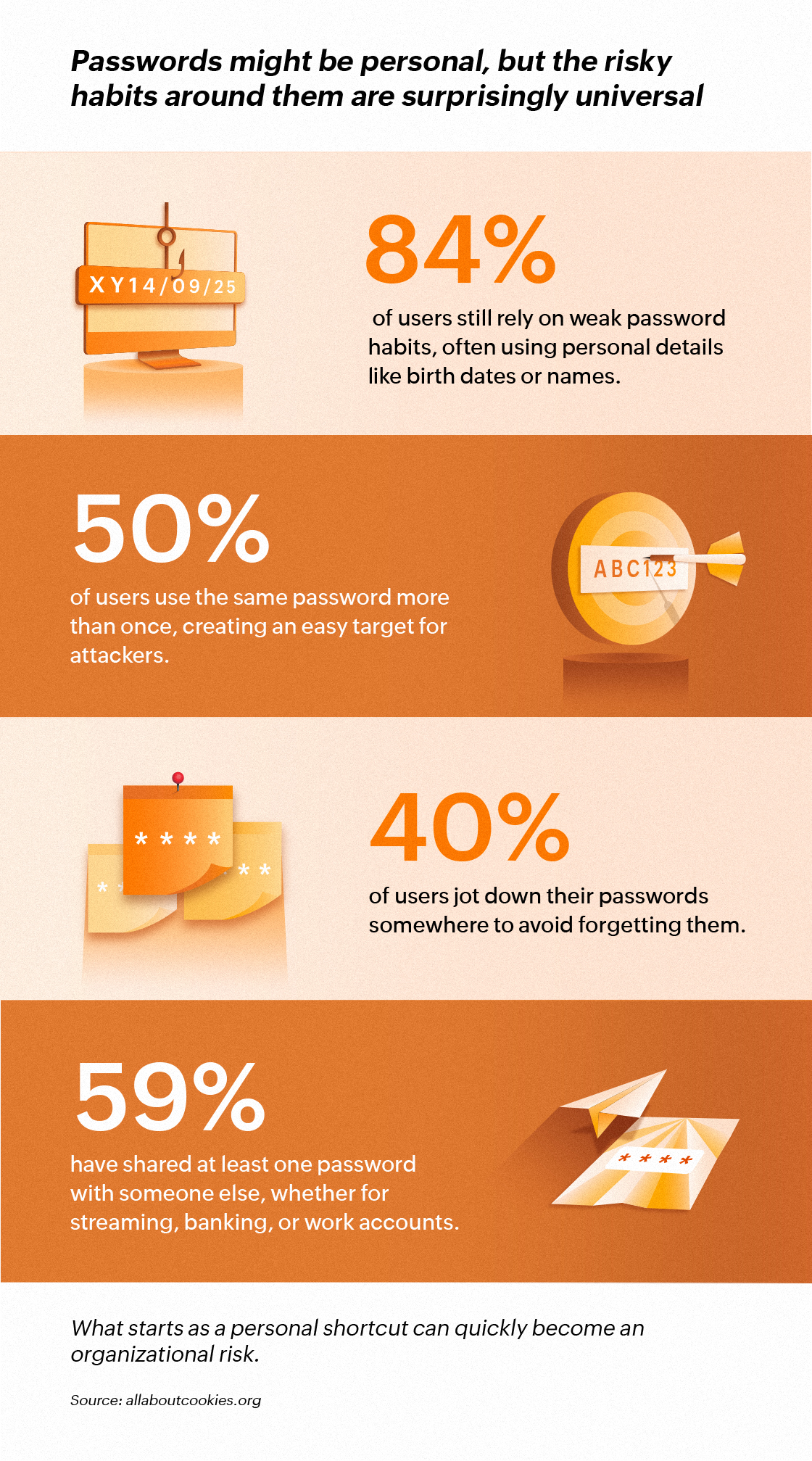
When personal becomes enterprise

In 2024 alone, human error fueled 95% of data breaches.

And the problem is rarely a lack of tools. Most companies already have MFA, SSO, and strict password policies in place. But those don’t mean much if users are:

  • Reusing corporate passwords across personal sites.
  • Clicking on links that seem perfectly legitimate.
  • Bypassing password managers because they’re “too clunky”.

Even in high-security environments, a quiet culture of convenience can override compliance.
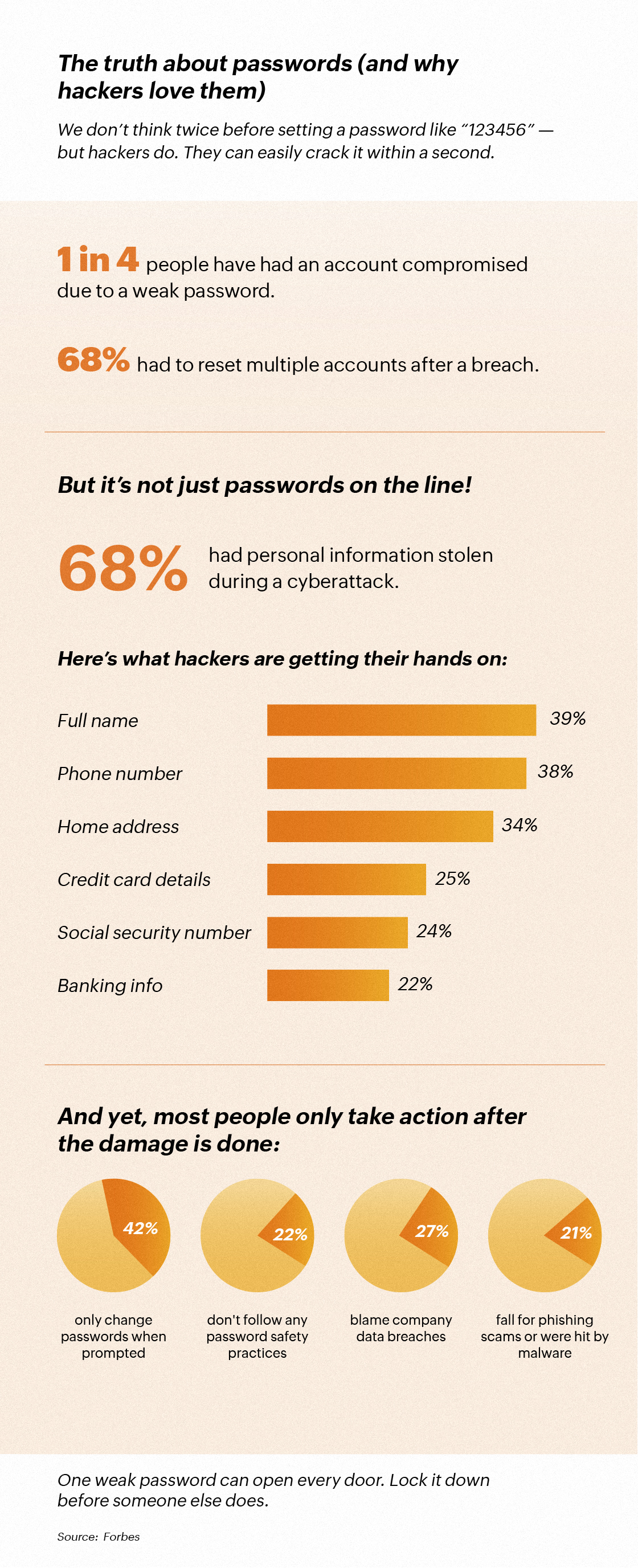
Fixing the culture

It’s easy to blame users. But a culture of community isn’t built by calling people careless. It’s built by designing solutions that align with how people actually behave.

In the real world, employees don’t wake up wanting to be insecure. They’re just trying to get their job done without getting locked out for the third time this week.

Here’s what needs to change:

Make security feel human, not corporate

Let’s be real: no one remembers that once-a-year security training filled with jargon and acronyms. It checks a box, but it doesn’t stick. What does? We have a few options. These include timely nudges that pop up when we are about to reuse a weak password, or a quick heads-up woven right into the tools we already use. The key is that the messages should feel more like they come from a colleague rather than a compliance officer. When security guidance is provided that sounds human, safety tips start to feel like part of the job, not an interruption or a directive. The goal isn’t fear, but to build online safety habits that last.

Make it simple and easy to do the right thing

Too often, security feels like something that gets in the way, such as password rules, and multi-step logins. No wonder people look for shortcuts! But when secure choices are made seamless, the need for work-arounds disappears. Providing frictionless tools like password managers helps remove cognitive clutter. The trick is to build systems that make secure behavior the easiest option and not the most frustrating one. Security will become second nature if people feel empowered.

Lead by example

Culture trickles from the top. If the C-suite treats security like an annoying speed bump, the rest of the organization will follow. But when leaders openly use password managers, share their own security wins (or fails), and treat best practices as part of how they work—not just policy—they normalize the behavior. It sends a message: “This matters to us.” When employees see their managers doing the right thing, it carries far more weight than any policy document ever could.

Build a security-first culture

Real change doesn’t happen in company-wide announcements. It happens when a teammate reminds someone not to share credentials on the team chat platform, or when IT responds with appreciation instead of frustration. It’s in the little moments. These micro-habits signal that security isn’t a separate “thing”—it’s part of how work is accomplished. That’s when the culture truly starts to change.

When tools fall short, culture steps in

Security tools will keep evolving. AI will get smarter. Frameworks will get tighter.
But there’s one thing that no upgrade can replace: trust in the people using them.

In the end, the strongest line of defense isn’t a system; it’s a workforce that knows what’s at stake and feels empowered to act.

Want better security? Start by designing for the human operating system.
Sneha Banerjee

Sneha Banerjee

Enterprise Analyst, ManageEngine

Want to read<br>this article on the go?

Want to read
this article on the go?

Do it on the ManageEngine
Insights app.

Published on November 03, 2020 | 3 min

Poor password habits have led to serious breaches over the years. According to Verizon’s latest data breach investigation report, over 80 percent of data breaches are tied to compromised passwords. That said, by no means are we approaching the end of the password era; in fact, passwords are still superior to emerging blockchain technologies and biometrics.

Biometric solutions are far from a panacea

Passwords are either entirely right or entirely wrong. Conversely, biometrics solutions require a margin of error, which can be problematic. To give a slightly innocuous example, many people can open their relatives’ mobile phones through facial recognition applications. On a more sinister note, hackers from Tencent can access phones via fingerprint scanners in under twenty minutes. Likewise, for years, scholars have shown that it is possible to bypass fingerprint readers with 2.5D fingerprint spoofs. Put simply, biometrics are not immune to breaches, and most importantly, if biometric data is stolen, it cannot be replaced.

This isn’t mere conjecture, as we’ve already seen biometric breaches in the real world. Last year, web privacy company vpnMentor found that Suprema’s security platform, Biostar2, was comprised. According to vpnMentor, the breach exposed facial recognition and fingerprint records for over 1 million people. Suprema had saved exact copies of users’ fingerprints, potentially compromising these individuals’ biometric information forever.

For companies like Suprema that store users’ biometric data, it’s wise to utilize blockchain technology to protect this data. Blockchain technologies have also been viewed as a suitable replacement for passwords in and of themselves; however, we are still years away from this.

We’re years away from a blockchain replacement

For years, whitehat hackers have suggested that blockchain distributed ledger technology (DLT) could replace traditional passwords. Several start-ups, such as Remme, already provide the service. Through the DLT model, devices are issued an SSL certificate, which is stored in a blockchain ledger (in Remme’s case, it’s Hyperledger Sawtooth). When a user attempts to log into an account, the user’s identity is verified by this technology. There is no centralized server or password database, which theoretically means that bad actors are left without a central point to target.

In theory, this emerging technology sounds great; however, it does not come without a cost. As computer scientist Nina Polshakova has shown, storing even 100 passwords on the Bitcoin blockchain ledgers can be extremely expensive. Moreover, according to Gartner, blockchain technologies are entering the “trough of disillusionment” section of the Hype Cycle, and most enterprises are still approximately seven years away from employing such technologies in a way that is operationally scalable. Additionally, some enterprises are wary of blockchain enterprises, as many crypto service providers have been mired in scandal.

As a caveat, several rather promising companies have appeared on the scene. The Syndey-based non-profit Tide Foundation is pilot-testing a technology that involves “splintering,” which is essentially a more complex version of hashing. Through splintering, passwords are broken up into small pieces and stored via a decentralized blockchain; every password is “splintered” to at least 20 nodes on Tide’s public blockchain, making these passwords 14 million times more difficult for hackers to access.

Their splintering technology has proven to be quite resilient. Despite 6.5 million attempts last year, no hackers were able to conduct a successful dictionary attack on a dataset protected by Tide’s technology. The non-profit intends to keep this technology open-source and to release it later this year for commercial use. Although Tide’s new technology sounds promising, it remains to be seen whether it will be adopted by mainstream enterprises.

Conclusion

Although passwordless authentication options are gaining prominence, there’s a reason why we’re still using passwords 60 years after their inception: they’re effective. Unlike biometric data, passwords are either definitively right or definitively wrong. With passwords, there is no ambiguity. Most importantly, passwords can be easily replaced if they are compromised. Biometric data—irises, faces, or fingerprints—can never be replaced in the event of a breach. Lastly, despite the strong work put forth by companies such as Remme and the Tide Organization, it remains to be seen whether such emerging technologies will see mass adoption.

John Donegan

John Donegan

Enterprise Analyst, ManageEngine

Want to read<br>this article on the go?

Want to read
this article on the go?

Do it on the ManageEngine
Insights app.

Published on July 28, 2020 | 3 min

According to the most recent version of the NIST cybersecurity framework, it’s no longer advisable to mandate periodic password resets. For years now, thought leaders in the space, including Lorrie Cranor, the former chief technologist at the FTC, have been arguing that mandatory password resets are counterproductive to password security. Back in 2015, a quantitative study from Sonia Chiasson and Paul van Oorschot, two scholars at Carleton University’s School of Computer Science, found that forcing employees to do password resets resulted in “questionable benefits.”

The general rule of thumb in 2020 is that you only need to force employees to change their passwords if there has been evidence of a breach, and large enterprises are taking note. The official line from Microsoft is: “If a password is never stolen, there is no need to expire it.” That said, the Seattle-based tech giant recommends that enterprises use two-factor authentication (2FA), while also enforcing banned password lists and requiring employees to use passwords of a certain complexity, length, and history. As long as these protections are in place, there is no need to mandate periodic password changes. In fact, requiring password resets can make your network less safe.

Employees create similar passwords and rely on Post-it Notes

To begin with, the average business user has an average of 191 passwords. With so many passwords to remember, employees tend to create similar passwords when they’re forced to change their existing passwords. This, in and of itself, is dangerous, especially if there has been a breach in the past. Moreover, frequent mandatory resets cause some employees to resort to writing passwords on Post-it Notes at their workstations.

It causes employee downtime and places an undue burden on service desks

To be sure, there are monetary consequences associated with mandatory password resets, as employees aren’t able to work while they wait for a system administrator to assist them. According to a 2018 Forrester report, the average cost of a password reset is $70.

As Cameron Covert, Zoho director of US events, explains, “The whole time you’re trying to figure it out, you’re not working. At a minimum, you’re looking at downtime of at least thirty minutes.”

Password resets become especially frustrating for employees who work from home. Covert laments, “When you forget your password, you have to call your sys admin. And lot of employees don’t know what their sys admin’s phone number is. Plus, you can’t get on your internal chat tool—be it Cliq or Slack or Google Chat—so you can’t message your support team. It’s a headache, especially if you’re working from home.”

Weakening employee morale

Employees find frequent password resets to be a nuisance. Tom Phillips, Zoho operations manager says, “I understand the reason for [mandatory password resets], I guess, but selfishly as a user, it’s very annoying. Also, I put all my passwords in a sheet, so if somebody gets their hands on that sheet, they can ransack my identity. All bets are off at that point.”

Conclusion

Although the NIST framework now suggests that mandatory resets are unnecessary, it’s important to point out an important caveat: passwords are here to stay for the foreseeable future. This is true, even though 81% of hacking breaches are due to compromised passwords. Passwords are arguably superior to biometric information because unlike biometric data, passwords are either completely right or completely wrong.

Biometric information that is partially correct can sometimes unlock accounts; for example, studies have shown that some children’s faces are similar enough to unlock their parents’ accounts. Also, there have been several cases of stolen fingerprint data, and once this biometric information is stolen, it can’t be undone.

As Microsoft’s new password policy makes clear, multi-factor authentication is key, and passwords should always be of a certain length and complexity. While it’s wise to discontinue mandatory password resets, it is also important that enterprises bolster their account security in other ways.

Tools that facilitate mobile device management, privileged access management, and remote password resetting can strengthen your enterprise’s password security. Also, log monitoring tools can be put into place, ensuring that any anomalous activity is detected in time. The bottom line is—you should feel free to abolish mandatory password resets, but don’t neglect your other password security initiatives.

John Donegan

John Donegan

Enterprise Analyst, ManageEngine

Want to read<br>this article on the go?

Want to read
this article on the go?

Do it on the ManageEngine
Insights app.

Published on June 30, 2020 | 3 min

We’re on the cusp of a new tech era, with advances like driverless cars, human-machine integration, and groundbreaking robotics. So it’s somewhat surprising that we’re still relying on passwords. Although passwordless authentication options are gaining prominence, there’s a reason why we’re still using passwords 60 years after their inception: they’re effective.

Unlike facial recognition and other biometric solutions, passwords are either completely right or completely wrong. Currently, biometrics require a margin of error; for example, it has been shown that people can open their relatives’ phones via facial recognition apps. Even more importantly, if one’s biometric data is ever compromised, it can never be replaced.

Unfortunately, we have already seen a major breach of biometric data. Last August, web privacy company vpnMentor discovered a breach in Suprema’s security platform, Biostar2, which exposed facial recognition data and fingerprint records for one million people. According to vpnMentor, Suprema saved exact copies of users’ fingerprints, potentially compromising these individuals’ biometric information forever. For companies that do store users’ biometric data, it’s wise to utilize hashing or blockchain technology to protect this data. Nevertheless, unlike passwords, biometric data—be it irises, faces, or fingerprints—cannot be replaced.

For the time being, passwords are here to stay; however, there are some important things to consider.

It’s wise to use multi-factor authentication.

Whether you use password-based authentication or not, your organization should require multi-factor authentication (MFA). There is no excuse not to employ MFA, especially with the current proliferation of applications that enable such services.

Do not require mandatory password resets.

If your organization does have MFA in place, you definitely should not require the mandatory password resets. In fact, such requirements arguably make your network less safe, as employees tend to write their passwords on Post-It notes at their work stations, and resort to using similar passwords, as well as passwords that are easy for hackers to guess. As a caveat, if employees change roles within your organization, it may make sense to require a password reset. Ideally, this reset request should be automated as part of the transfer process.

Require complex passwords.

Given that password brute force attacks are still the most common form attack, it is still important to require complex passwords and disallow weak passwords. The NIST recommends requiring long, complex passwords that employees haven’t used in the past.

Manage privileged accounts separately.

It is wise to consider utilizing an enterprise grade password manager to stay on top of password security issues. Additionally, as privileged accounts are typically shared by a few people in an organization, you should consider having a separate program to manage the passwords for these privileged accounts. To get certain tasks completed, your system administration should be able to elevate privileges for any given user for a set period of time, and if necessary, your sys admin should also be able to disable direct authentication to all privileged accounts.

Look into passwordless authentication options.

Despite the effectiveness of passwords, wherever possible you can look to eliminate or disable password based authentication. Passwordless authentication, such as one-time passwords (OTPs) sent via email and/or SMS, are becoming increasingly popular. If you decide to introduce a passwordless authentication option for select business accounts, be sure to consider employing two or more options; this way you can effectively remove passwords without compromising your security.

Conclusion

Until passwordless authentication options and biometric solutions become more advanced, it is wise to rely on long, complex passwords and multi-factor authentication. Unlike passwords, biometric solutions—fingerprint modules, iris scanners, and voice recognition systems—require a margin of error. Additionally, as we saw in the breach of Suprema’s biometric database, if such an event does occur, users’ sensitive biometric data is compromised for life.

Put simply, for the time being, passwords are the safest route for your organization to take from a security perspective.

Disclosure: This article was originally published in DisruptionHub.

Rajesh Ganesan

Rajesh Ganesan

CEO at ManageEngine (Zoho), ManageEngine

Want to read<br>this article on the go?

Want to read
this article on the go?

Do it on the ManageEngine
Insights app.

Subscribe to password management

Thanks for subscribing to ManageEngine Insights. If you do not receive our welcome email, please check your SPAM folder.